
From blended classrooms to fully remote learning, teachers require tools that support communication, collaboration, accessibility, and assessment in one secure place. This is where Microsoft Teams for Education comes in.
Today, over 100 million students and hundreds of thousands of schools worldwide use Microsoft Teams as part of Microsoft 365 for Education, making it one of the most widely adopted digital learning platforms globally. Its popularity is driven by its ability to centralise teaching activities, streamline workflows, and support inclusive, engaging learning experiences.
In this blog, we’ll explore:
- What Microsoft Teams for Education is
- The essential features teachers should know
- How AI, accessibility, and insights support better teaching outcomes
- How Teams helps learners build critical digital skills
Whether you’re new to Teams or looking to use it more efficiently, this guide will help you unlock its full potential in the classroom.
What is Microsoft Teams for Education?
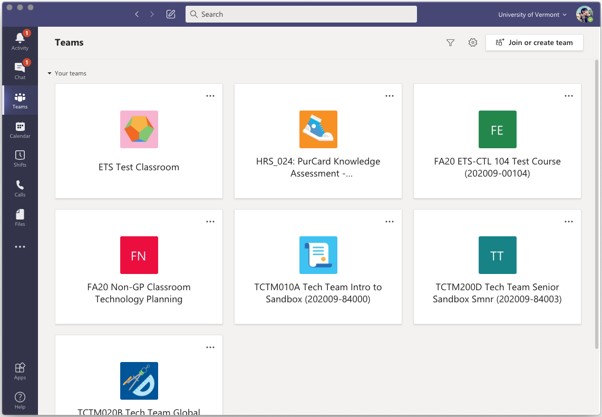
Microsoft Teams for Education is a digital learning hub designed specifically for schools, colleges, and universities. It brings together communication, content sharing, assignments, assessments, and collaboration tools into a single platform.
Teachers use Teams to:
- Host live or recorded lessons
- Share learning materials and resources
- Assign and grade work
- Provide feedback and support
- Collaborate with colleagues and students
For students, Teams provides a controlled, safe environment where learning materials, deadlines, conversations, and feedback are always accessible.
The Features of Microsoft Teams for Education
Microsoft Teams for Education includes a comprehensive set of tools designed to support teachers at every stage of the teaching and learning journey. Rather than relying on multiple disconnected platforms, Teams brings communication, content delivery, assessment, feedback, accessibility, and analytics together in one secure digital environment.
Below are the most essential features every teacher should understand to use Microsoft Teams for Education effectively and confidently.
Organise and Share Content and Files
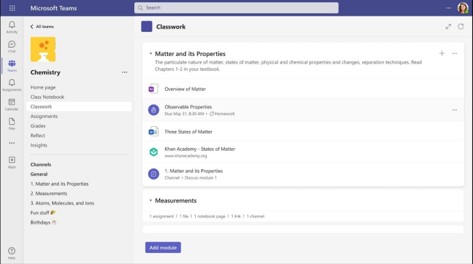
Every class team includes a Class Materials folder, a read-only space where teachers can securely share resources such as lesson slides, worksheets, and reference materials.
Benefits include:
- No accidental edits or deletions
- Easy access for students at any time
- Seamless integration with OneDrive and SharePoint
This ensures learning content stays organised and consistent across the class.
AI-Enhanced Features of Microsoft Teams
AI is transforming education, and Microsoft Teams includes built-in AI tools to support both teachers and students.
One of the most robust additions is Copilot Chat, directly integrated into Teams. Copilot can:
- Summarise meetings and class discussions
- Help draft lesson plans, instructions, or announcements
- Generate ideas, quizzes, and content outlines
- Answer questions using uploaded files and class context
By decreasing administrative workload, AI allows teachers to focus more on teaching and student support.
Collaboration, Live Teaching, and Classroom Interaction
Microsoft Teams supports real-time collaboration and live instruction through a range of interactive tools.
- Teachers can use screen sharing to present lesson content, demonstrate software, or walk through examples in real time.
- Digital whiteboards, including Microsoft Whiteboard, allow teachers and students to collaborate visually through drawing, sticky notes, and diagrams.
- Breakout room functionality enables small-group discussions, peer collaboration, and differentiated activities within a single class meeting.
Assignments Features and Grades
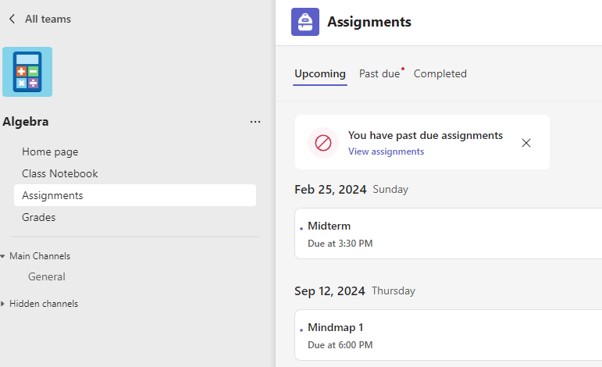
Assignments in Teams are tightly integrated with Learning Tools and Microsoft 365 apps, making assessment simpler and more flexible.
Teachers can:
- Create, distribute, and collect assignments digitally
- Use OneNote Class Notebooks for personalised learning spaces
- Give feedback directly in Word, Excel, and PowerPoint
- Integrate third-party tools like Kahoot!, Pear Deck, and more
- Create quizzes, surveys, and quick knowledge checks using Microsoft Forms, with results automatically captured in Teams
Within the Assignment features, grading rubrics are another powerful tool.
Rubrics distinctly define assessment criteria and performance levels, helping students understand expectations and enabling consistent, transparent grading. Teachers can create rubrics directly in Teams and reuse them across assignments.
The Tips Pane supports both educators and students by offering contextual guidance on assignments, feedback, and grading workflows, helping everyone get the most out of the platform.
Accessibility & Support in Microsoft Teams
Inclusive education is a core strength of Microsoft Teams. Built-in accessibility tools ensure all learners can participate fully, regardless of ability or learning style.
Key accessibility features include:
- Immersive Reader for improved reading comprehension
- Automatic captions and CART captions (human-generated)
- Real-time text (RTT) for live communication
- Voice commands and keyboard navigation
- Screen reader support
- Teams Intelligent Speakers for clearer audio
These tools help create equitable learning environments that support diversity, inclusion, and personalised learning needs.
Insights & Analytics Features of Microsoft Teams for Education
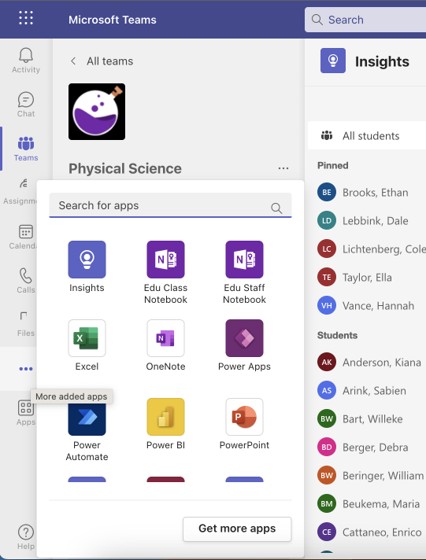
The Insights app gives educators valuable data to support student success and informed teaching decisions.
With Insights, teachers can:
- Track student engagement and activity
- Monitor assignment completion and participation
- View Reading Progress data
- Identify trends and students who may need additional support
- Differentiate instruction and document academic progress
Data-driven insights encourage educators to intervene early, personalise learning, and continuously improve outcomes.
Key benefits of Microsoft Teams for Education
Key benefits of Microsoft Teams for students and school leaders include:
- Centralised learning – All conversations, files, assignments, and grades live in one place, reducing confusion for both teachers and students.
- Flexible teaching models – Supports in-person, remote, and hybrid learning with equal effectiveness.
- Improved collaboration – Encourages student participation through chats, channels, group work, and live discussions.
- Built-in intelligence – AI-powered tools help streamline planning, summarise content, and provide actionable insights.
- Inclusive design – Accessibility features ensure all learners can engage fully, regardless of ability or learning needs.
- Real-world digital skills – Students gain hands-on experience with tools used in higher education and the workplace.
This unified setup also supports ongoing professional development for educators by reducing tool overload and enabling consistent digital teaching practices, while enhancing student progress
From everyday classroom communication to advanced analytics that inform instruction, Microsoft Teams supports the entire teaching and learning lifecycle, planning, delivery, assessment, feedback, and reflection.
How can Microsoft Teams enhance learners’ digital skills?
Using Microsoft Teams helps students build essential digital competencies they’ll need beyond the classroom, including:
- Online communication and collaboration
- File management and digital organisation
- Responsible digital citizenship
- Familiarity with productivity tools used in higher education and the workplace
By working within Microsoft 365, learners gain practical experience with real-world digital tools.
Final Thoughts
Microsoft Teams for Education is more than a virtual classroom; it’s a complete learning ecosystem. From communication and collaboration to AI-powered support, accessibility, and insights, it enables teachers to teach more effectively while preparing students for a digital future.
If your institution is already using Microsoft 365 for Education, now is the time to unlock the full power of Microsoft Teams. Explore its features, experiment with AI and Insights, and transform the way teaching and learning happen in your classroom.
Need help getting more from Microsoft Teams or moving to Microsoft 365?
Contact Qlic for Education: our team specialises in empowering schools with the right tech solutions.
Microsoft Teams for Education: Frequently Asked Questions
Which is better for teaching: Zoom or Teams?
It depends on how you teach. Zoom excels at live delivery: it’s simple, reliable, and well suited to lectures, seminars, and guest sessions where the focus is real-time interaction. Microsoft Teams, on the other hand, is better for ongoing courses. It combines video teaching with assignments, file sharing, grading, and collaborative workspaces, making it easier to manage learning before, during, and after sessions.
What is the benefit of using Teams for classroom group projects?
Students can collaborate in channels, share files, chat, meet virtually, and manage tasks — all within a single workspace.
Why are there two different Microsoft Teams apps?
Microsoft offers different Teams experiences optimised for work and education, with education-specific features like Class Teams, Assignments, and Insights.
What are the features of Microsoft Teams for Education?
In a nutshell, key features include:
- Communication tools
- Assignments and grading
- AI-powered Copilot
- Accessibility tools
- Analytics,
- Integration with the Microsoft 365 suite apps.
- Chat and online meetings
- File sharing
- Robust security and compliance controls.